NRSC- 5 US HD Radio, Plugin for SDRSharp?

Okay, an old black-and-white TV decoder isn’t exactly going to get anyone jumping out of their seat anymore. Still, it works reasonably well—and it’s far from finished yet…

Anyway. An idea has been rattling around in my head for quite some time now: the US digital HD Radio standard, NRSC-5.
After all, everything is explained right there across a mere five PDFs—each containing what feels like 500 pages. Plus, a few fellow enthusiasts have actually already developed decoders for it. Naturally, though, they were designed exclusively for RTL-SDR sticks. No one had the Spyserver on their radar.
Will I ever actually pull it off? I’m just going to give it a shot… Anyone care to help?

OK, ein alter schwarzweiß TV Decoder lockt keinen mehr, hinterm Ofen hervor. Immerhin funktioniert er einigermaßen und fertig ist er lange noch nicht…

Egal. Eine Idee schwirrt mir schon lange im Kopf herum. Das digitale US HD-Radio NRSC 5.
In schlappen 7 PDFs mit jeweils, gefühlten 500 Seiten ist ja alles erklärt. Ausserdem haben ein paar Mitstreiter tatsächlich schon Decoder entwickelt. Natürlich nur für RTL-SDR Sticks. Niemand hatte den Spyserver auf dem Schirm.
Ob ich das jemals schaffe? Ich probiere es einach mal…wer mag helfen?

Infos über:

NRSC 5 HD Radio PDF 1-5

NRSC 5-d PDF

NRSC 5 e-Reverence dokument

NRSC-5 master - software Decoder

yellowShoes-yellowShoes_with_Webamp_Milkdrop

nrsc5-3.0.1

nrsc5-gui-master

nrsc5 - viele dlls

nrsc5-0.1.1-debug

nrsc5-macos (leider fehlt das Passwort)

ua…

Gruß Micha

Ich glaube, ich bin nicht allein, leider keine Plugins…aber relativ aktuell..

Gruß Micha

So… even though I don’t post much here, I’m still working away diligently. However, the project is very extensive and challenging for me.

The foundation for the decoder is the command-line program “NRSC5 HD-Master.”
Unfortunately, this program accesses the RTL-SDR dongle directly. It would be better if it interfaced with the SDR# (SDRSharp) program, as that would allow it to be used with Spyserver.

The code is written in C++. As I understand it, I have no choice but to rewrite the whole thing in C. That’s no easy task when you’ve never done it before.

NRSC5-Studio is a graphical interface that significantly enhances the NRSC5 HD-Master program, making the command-line tool much more user-friendly.

I certainly don’t want to take credit for work that isn’t mine, but I did acquire it for learning purposes. Of course, it doesn’t actually work yet.
I haven’t refined the GUI further because the Visual Studio graphical designer frequently flags even the slightest errors and then stops working. I can always work on that later; the decoder is the priority right now.

So… auch wenn ich hier wenig poste, so arbeite ich trotzdem fleissig weiter. Aber es ist sehr umfangreich und schwer für mich.

Die Grundlage, mit dem Decoder, bildet das CMD-Line Programm “NRSC5 HD- Master”.
Leider greift dieses Programm direkt auf den RTL-SDR Stick zu. Besser wäre der Zugriff, auf das SDRsharp Programm und wäre dann mit dem Spyserver nutzbar.

Der Code ist in C++ geschrieben. Wenn ich das richtig verstehe, komme ich nicht daran vorbei, das ganze in C umzuschreiben. Gar nicht so einfach, wenn man das noch nie gemacht hat.

Das NRSC5- Studio, ist eine grafische Maske, die das NRSC5 HD Master Programm extrem aufwertet und das CMD-Line Programm bedienerfreundlich gestaltet.

Ich möchte mich hier keinesfalls mit fremden Federn schmücken, habe mir das dennoch besorgt, um zu lernen. Funktionieren tut es natürlich nicht.

Ich habe meine Grafik noch nicht weiter ausgearbeitet, weil der VS-Grafik- Designer sehr häufig, schon kleinste Fehler ankreidet und dann nicht mehr funktioniert. Ausarbeiten kann ich das immer noch. Der Decoder hat jetzt Vorrang.

Gruß Micha

So, anyone who thinks nothing is happening here just because nothing visual is being uploaded is mistaken.
It is—especially for me—very difficult, extremely extensive, and time-consuming; and, of course, it is a hobby. For starters, I only just realized that all the plugins are written in C#. I hadn’t been aware of that for a long time—likely due to the name similarity with SDR# (SDR-Sharp).
Unfortunately, the software I would like to use is written in C++—similar, but not fully compatible.
However, NRSC5-Master and Studio-Main have an advantage: as far as I can tell, the complete decoder for NRSC5 HD is included. That isn’t the case with most other programs.
Unfortunately, that’s also where the downsides begin. While reading the info texts for Studio-Main, I noticed that—wonder of wonders—there is an IP interface. This is used to route the I/Q or RAF stream from the RTL-SDR to the program. Unfortunately, it handles all the control commands, too. The whole thing is converted into a special BUS data stream (similar to an I2C bus). It seems they deliberately want to prevent the input of other data (e.g., from SDR# / Spyserver)… a pity.
I’m going to keep going anyway. Since the program is so complex and the intermediate steps aren’t visible, my idea was to incorporate a logger and a spectrum analyzer. That way, I can see if the program is starting up and what’s happening inside it…
It’s certainly a long road ahead…

Also, wer denkt, es passiert hier nix, nur weil optisch nichts hochgeladen wird, irrt.
Es ist halt, vor allem für mich sehr schwierig, extrem umfangreich, zeitaufwendig und natürlich ist es ein Hobby. Zuersteinmal habe ich jetzt erst begriffen, dass die ganzen Plugins in Csharp geschrieben sind. Das war mir lange nicht bewußt, wg der Namensgleichheit von SDRsharp- OK.
Die Software die ich gerne hätte, ist leider in C++ geschrieben- ähnlich, aber nicht ganz kompatibel.
Aber NRSC5-Master und Studio-Main haben einen Vorteil- soweit ich das ersehe, ist der komplette Decoder für NRSC5 HD enthalten. Das trifft auf die meisten anderen Programme nicht zu.
Leider fangen hier auch schon die Nachteile an. Beim lesen der Info-Texte des Studio-Main, ist mir aufgefallen, dass es (wie wunderbar) eine IP-Schnittstelle gibt. Hierrüber wird der I/Q bzw. RAF-Stream vom RTL-SDR zum Programm geleitet. Leider auch alle Steuerbefehle. Das Ganze wird in einen speziellen BUS- Datenstrom gewandelt (ähnlich einem I2-CBus). Die Einspeisung anderer Daten (zB. aus SDRsharp- Spyserver) soll offensichtlich verhindert werden…schade.
Ich werde trotzdem weitermachen. Meine Idee, weil das Programm so umfangreich ist, und Zwischenschritte nicht erkennbar sind, wollte ich einen Logger und einen Spectrumanalyser einbauen. Dann kann ich sehen, ob das Programm startet und was darin passiert…
Es ist halt ein weiter Weg…

Gruß Micha

ein paar uralte, aber gute Ideen gibts hier:

I was actually happy to finally find a spectrum analyzer as an SDR# plugin. The source code is ancient but appears to be complete. I made a few minor adjustments and used Visual Studio to build a DLL file. Everything worked fine, yet no version of SDR#—old or new—will accept the file.
I really wanted to try out this program and use it as a stepping stone for further experiments.
It’s a shame. Now I have no choice but to modify the source code step by step. The analyzer isn’t working yet, and the scan function is unnecessary. A compact analyzer—like the ones built into many SDR# versions—would be better, but that isn’t available separately; at least, I haven’t found one. We’ll see how far I get and whether I’ll be able to use this analyzer down the line…

Eigentlich war ich froh, endlich einen SpectrumAnalyser, als SDRsharp Plugin gefunden zu haben. Diese Quelltexte sind uralt, und offensichtlich komplett.

Ein bischen habe ich sie angepasst und mit Visual Studio eine dll Datei erstellt. Das hat auch alles funktioniert, jedoch wird diese Datei von keiner SDRsharp Version akzeptiert. (weder alte, noch neue Versionen).
Ich wollte doch dieses Programm mal ausprobieren und als Zwischenschritt für weitere Versuche benutzen.
Schade. So bleibt mir nichts anderes übrig, als die Quelltexte, Schritt für Schritt anzupassen. Der Analyser funktioniert noch nicht und die Scan-Funktion ist unnötig. Schöner wäre ein kleiner Analyser, wie in vielen SDRsharp Versionen integriert. Diesen gibt es aber nicht separat. zumindest habe ich keinen gefunden. Mal sehen, wie weit ich komme und ob ich diesen Analyser demnächst weiter verwenden kann…

gruß Micha

using System;
using System.Collections.Generic;
using System.Linq;
using System.Text;
using System.Threading.Tasks;
using SDRSharp.Common;
using SDRSharp.Radio;

namespace SDRSharp.SpectrumAnalyzer
{
public unsafe class SpectrumAnalyzerPlugin : ISharpPlugin, IIQProcessor
{
double _sampleRate;
ISharpControl _control;
SpectrumAnalyzerPanel _gui;
SpectrumAnalyzerDrawing _drawing;
bool _scanning;
Complex _workingBuffer;
float _window;
float _spectrum;
System.Threading.Timer _timer;
long _checkedFrequency;

    public void Close()
    {
        StopScanning();
    }

    public string DisplayName
    {
        get { return "Spectrum Analyzer"; }
    }

    public System.Windows.Forms.UserControl Gui
    {
        get { return _gui; }
    }

    public void Initialize(ISharpControl control)
    {
        _control = control;
        _gui = new SpectrumAnalyzerPanel();
        _gui.OnScanning += OnScanning;

        _drawing = new SpectrumAnalyzerDrawing();
        _drawing.OnFreqChange += ChangeFrequency;
        _drawing.SetRanges(_gui.StartFreq, _gui.EndFreq, _gui.Step);
        _drawing.Frequency = _control.Frequency;
        if (_gui.ShowSpectrum == false)
            _drawing.Hide();

        _timer = new System.Threading.Timer(state => OnScanning(), null, System.Threading.Timeout.Infinite, System.Threading.Timeout.Infinite);

        _gui.OnShowSpectrum += (show) => 
        {
            if (show)
                _drawing.Show();
            else
                _drawing.Hide();
        };

        _gui.OnExport += Export;
        _gui.OnAutoScan += AutoScan;

        _control.RegisterFrontControl(_drawing, PluginPosition.Bottom);
        _control.RegisterStreamHook(this, ProcessorType.RawIQ);
        _control.PropertyChanged += OnPropertyChanged;

        AutoScan();
    }

    private void OnPropertyChanged(object sender, System.ComponentModel.PropertyChangedEventArgs e)
    {
        if (e.PropertyName != "Frequency")
            return;

        _drawing.Frequency = _control.Frequency;
    }

    private void ChangeFrequency(float frequency)
    {
        _control.SetFrequency((long)(frequency * 1000000), false);
    }

    void Export()
    {
        Export(null);
    }

    void Export(string fileName)
    {
        var data = _drawing.GetDataPoints();
        if(data.Length == 0)
            return;

        if (fileName == null)
        {
            var dlg = new System.Windows.Forms.SaveFileDialog() { DefaultExt = "csv", Filter = "CSV Files (*.csv)|*.csv" };
            if (dlg.ShowDialog() == System.Windows.Forms.DialogResult.OK)
                fileName = dlg.FileName;
        }

        if(fileName != null)
        {
            try
            {
                using (var writer = System.IO.File.CreateText(fileName))
                {
                    for (var n = 0; n < data.Length - 1; n++)
                    {
                        writer.Write(data[n].Key);
                        writer.Write(",");
                    }
                    writer.WriteLine(data[data.Length - 1].Key);
                    for (var n = 0; n < data.Length - 1; n++)
                    {
                        writer.Write(data[n].Value);
                        writer.Write(",");
                    }
                    writer.WriteLine(data[data.Length - 1].Value);
                }
            }
            catch(Exception ex)
            {

            }
        }
    }

    void AutoScan()
    {
        if (_gui.AutoScan)
            _timer.Change(0, _gui.AutoScanPeriod * 60000);
        else
            _timer.Change(System.Threading.Timeout.Infinite, System.Threading.Timeout.Infinite);
    }

    void OnScanning()
    {
        _scanning = !_scanning;

        if (_scanning)
            StartScanning();
        else
            StopScanning();
    }

    public void Process(Complex* buffer, int length)
    {
        if (!_scanning)
            return;

        if (_control.Frequency == _checkedFrequency)
            return;

        if (_workingBuffer == null || _workingBuffer.Length < length)
            _workingBuffer = new Complex[length];

        for (var n = 0; n < length; n++)
            _workingBuffer[n] = buffer[n];

        if (_window == null || _window.Length < length)
            _window = FilterBuilder.MakeWindow(WindowType.Hamming, length);

        fixed (Complex* workingPtr = &_workingBuffer[0])
        {
            fixed (float* winPtr = &_window[0])
                Fourier.ApplyFFTWindow(workingPtr, winPtr, length);

            Fourier.ForwardTransform(workingPtr, length);

            if (_spectrum == null || _spectrum.Length < length)
                _spectrum = new float[length];

            fixed ( float* spectrumPtr = &_spectrum[0])
                Fourier.SpectrumPower(workingPtr, spectrumPtr, length);
        }

        float avg = 0.0f;
        for (var n = 0; n < length; n++)
            avg += _spectrum[n];

        avg /= length;

        _drawing.AddDataPoint(_control.Frequency, avg);

        if (_control.Frequency > _gui.EndFreq * 1000000 - _gui.Step * 1000)
        {
            StopScanning();
        }
        else
        {
            if (_control.IsPlaying)
            {
                _checkedFrequency = _control.Frequency;
                _control.SetFrequency(_control.Frequency + _gui.Step * 1000, false);
            }
        }
    }

    private void StartScanning()
    {
        if (!_control.IsPlaying || _gui.StartFreq >= _gui.EndFreq || _gui.Step == 0)
        {
            _scanning = false;
        }

        if (_scanning)
        {
            _drawing.SetRanges(_gui.StartFreq, _gui.EndFreq, _gui.Step);
            _control.SetFrequency(_gui.StartFreq * 1000000, false);
            _checkedFrequency = 0;
            Enabled = true;
        }

        _gui.Scanning(_scanning);
    }

    private void StopScanning()
    {
        _scanning = false;
        Enabled = false;
        _gui.Scanning(_scanning);

        if(_gui.AutoScan && !string.IsNullOrWhiteSpace(_gui.AutoExportTo))
        {
            string fileName = DateTime.Now.ToString("ddMMyyyy_HHmmss") + ".csv";
            Export(System.IO.Path.Combine(_gui.AutoExportTo, fileName));
        }
    }

    public double SampleRate
    {
        set { _sampleRate = value; }
    }

    public bool Enabled { get; set; }
}

}

to many problems in this text…for me…

Gruß Micha

Gerade entdeckt…was es nicht alles gibt.. Das könnte eine große Hilfe sein, zum umwandeln der kleineren Dateien von NRSC5 HD Master…

Gruß Micha

Hi,

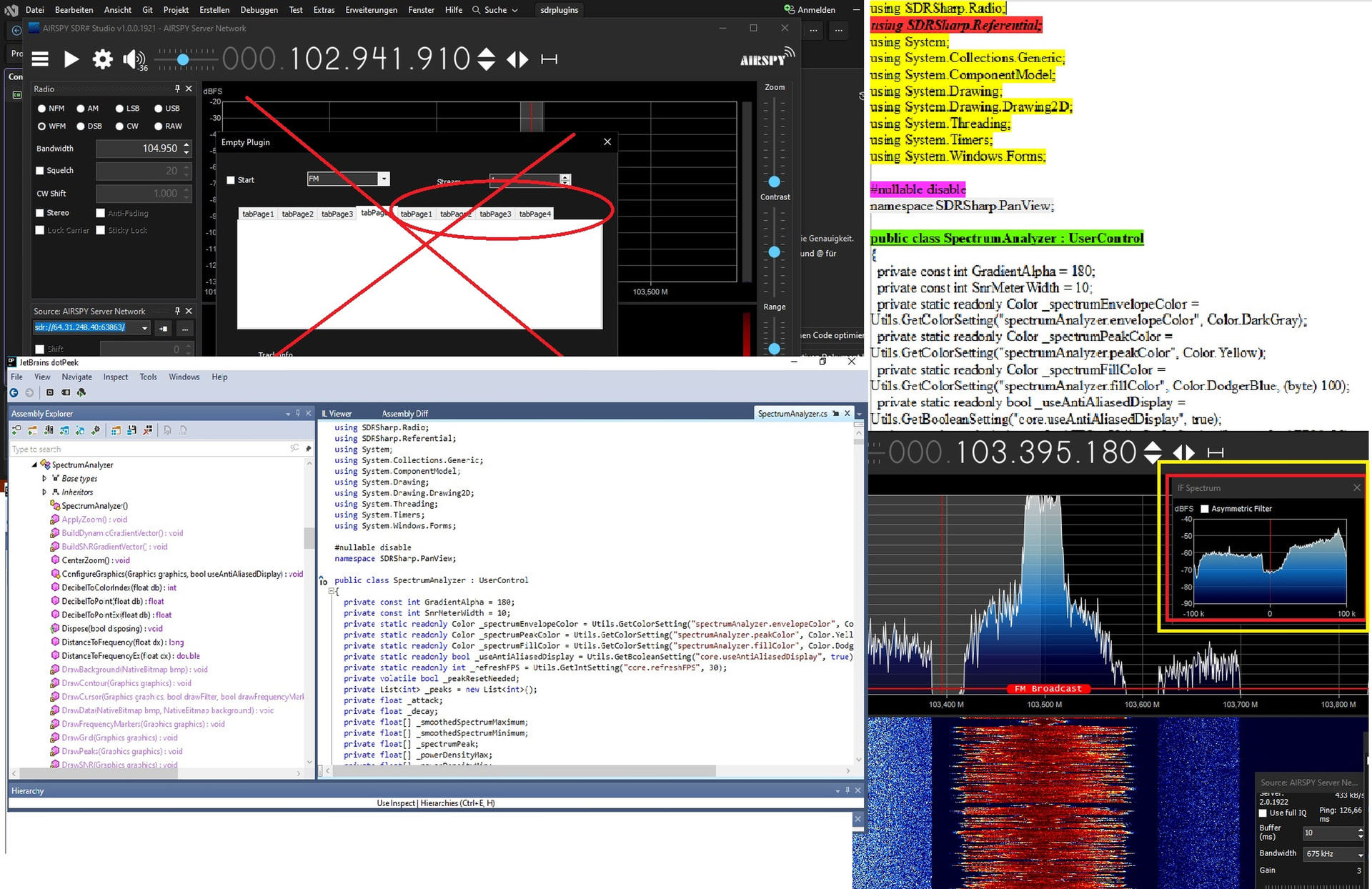
Things just aren’t going right at the moment. My plan to integrate a spectrum analyzer into my program has failed miserably. I’ve considered two options. One is using the SpectrumAnalyzer as a plugin—but I only get as far as the “Drawn-Monitor” and that’s it; the actual content remains hidden.

Another possibility lies in the `SDRsharp-PANView.dll` file. It contains virtually all the data needed to build an analyzer—though it’s extremely extensive, almost overwhelmingly so.

However, there is clearly a complication here: not all the data can be reconstructed using JetBrains, so a few key pieces of information are missing.

For example, here:

…. if (!string.IsNullOrEmpty(str1))

str1 = str1 + Environment.NewLine + Environment.NewLine;

string str2 = str1;

\u003C\u003Ey__InlineArray7 buffer = new \u003C\u003Ey__InlineArray7();

// ISSUE: reference to a compiler-generated method

\u003CPrivateImplementationDetails\u003E.InlineArrayElementRef<\u003C\u003Ey__InlineArray7, object>(ref buffer, 0) = (object) SpectrumAnalyzer.GetFrequencyDisplay(this._frequency);

// ISSUE: reference to a compiler-generated method

According to the information I have, this data was created using a different program (unknown to me) that is not included in this DLL. Consequently, JetBrains cannot reconstruct it.

Additionally, this specific file keeps appearing by name:

SDRSharp.Referential

I haven’t found anything about it yet; it was completely unknown to me until now.

JetBrains is great. You can convert all relevant DLLs into readable code and source code. This allows you to quickly see the functions and capabilities of the available elements.

Why do I need this analyzer? Well, it’s simple: I can program the panel—that’s a relatively easy step—but I can’t tell if it actually activates. The main analyzer in SDRSharp is always running, but I can’t see whether my panel or decoder has picked up a signal yet. I can’t program the whole thing in one go, so I need intermediate results. In a worst-case scenario, I’ll hook up a TV screen; at least then I’ll see static.

Things get trickier with the actual code (in this case, NRSC5HD-Master).

It’s written in C++ and can’t simply be converted into a plugin; it has to be rewritten in C#. Even then, the source code can’t be converted into a plugin one-to-one. The source code accesses an RTL-SDR via the command line, sending commands for frequency settings, bandwidth, and so on.

I don’t need that, since everything is set and supplied directly within SDRSharp. I only need the raw signal—before it undergoes any filter processing. It’s the same signal the TVPlugin uses, so the TVPlugin serves as the foundation for the new decoder.

Switching between AM and FM isn’t necessary at all; that just refers to the FM or AM frequency ranges. Digital demodulation works completely differently anyway and is handled within the NRSC5HD decoder itself. SDRSharp doesn’t care which frequency range is selected. The main thing is that a mixed digital-analog signal is set in the spectrum; regardless of the visible spectrum filter, a broad, complete signal—including both digital carriers—is captured, filtered, modulated, and subsequently decoded.

Things get more complicated from this point on, anyway… It is only after the audio and video material has been decoded that SDRSharp’s standard DLLs come into play again.

The IF spectrum analyzer included in SDRSharp would actually be sufficient for my needs, but I cannot extract it from the program.

Hi,

also derzeit ist der Wurm drin. Mein Plan einen Spectrum Analyser in mein Programm einzuarbeiten ist kläglich gescheitert. 2 Möglichkeiten die ich ins Auge gefasst habe. Zum einen der SpectrumAnalyser als Plugin- da komme ich bis zum Drawn-Monitor und das wars. Der wichtige Inhalt bleibt verborgen.

Eine weitere Möglichkeit wäre noch in der Datei SDRsharp- PANView.dll zu finden. Hier sind quasi alle Daten zum konstruieren eines Analysers enthalten. Sehr umfangreich- schon fast zuviel.

Offensichtlich gibt es hier aber noch eine Besonderheit. Nicht alle Daten können per JetBrains konstruiert werden und somit fehlen ein paar wichtige Daten.

zB hier:

…. if (!string.IsNullOrEmpty(str1))

str1 = str1 + Environment.NewLine + Environment.NewLine;

string str2 = str1;

\u003C\u003Ey__InlineArray7 buffer = new \u003C\u003Ey__InlineArray7();

// ISSUE: reference to a compiler-generated method

Laut meinen Informationen wurde diese Daten mit einem anderen (mir unbekannten) Programm erstellt, das nicht in dieser DLL enthalten ist. JetBrains kann das deshalb nicht rekonstruieren.

Zusätzlich taucht auch immer öfter diese Datei namentlich auf:

SDRSharp.Referential

Dazu habe ich überhaupt noch nicht gefunden. Diese war mir bis dato völlig unbekannt.

JetBrains ist super. Man kann alle relevanten DLLs in Klar- und Quelltexte verwandeln. Hier kann man sehr schnell die Funktionen und Möglichkeiten der benutzbaren Elemente ersehen.

Warum benötige ich den diesen Analyser? Ganz klar, also, ich kann das Panel programmieren. Ein relativ einfacher Schritt. Aber ich kann nicht ersehen, ob es anspringt. Dar große Analyser im SDRSharp ist immer an, aber ob mein Panel, bzw. Decoder schon ein Signal hat, kann ich nicht ersehen. Ich kann es nicht komplett, in einem Stück programmieren. Deshalb brauche ich Zwischenergebnisse. Schlimmstenfalls werde ich hier den TV-Bildschirm einbauen, dann sehe ich wenigstens Schnee.

Schwieriger wird es mit dem echten Code (hier NRSC5HD-Master).

Dieser ist in C++ verfasst und kann nicht als Plugin gewandelt werden. Das muss in Csharp umgeschrieben werden. Selbst dann können die Quelltexte nicht 1:1 in ein Plugin gewandelt werden. Die Quelltexte greifen per CMD-Line auf einen RTL-SDR zu. Der RTL-SDR erhält Befehle wie Frequenzeinstellung, Bandbreite, usw.

Das brauche ich nicht, da bei mir alles im SDRsharp direkt eingestellt und geliefert wird. Ich brauche nur das Roh- bzw Raw-Signal vor der ganzen Verarbeitung durch Filter. Es ist das gleiche Signal, das das TVPlugin benutzt. Das TVPlugin bildet somit die Grundlage für den neuen Decoder .

Die AM/FM Umschaltung ist überhaupt nicht erforderlich. Sie deutet nur auf den UKW- oder MW Frequenzbereich hin. Die Demodulation ist digital ohnehin völlig anders und im NRSC5HD Decoder enthalten. SDRSharp ist es völlig egal, welcher Frequenzbereich eingestellt ist. Hauptsache ist, das im Spectrum ein digital-analog Mix Signal eingestellt ist, Unabhängig vom sichtbaren SpectrumFilter wird ein breites, komplettes Signal, mit beiden digital-Trägern abgegriffen, gefiltert Moduliert und weiter decodiert.

Ab hier wird es dann ohnehin komplizierter…Erst wenn das Audio- und Bildmaterial decodiert ist, helfen wieder unsere Standard DLLs von SDRsharp.

Der IF-Spectrum Analyser, enthalten im SDRSharp, würde mir schon reichen, aber ich bekomme diesen nicht aus dem Programm getrennt.

Gruß Micha


There are things I don’t need to understand… where the hell did she come from?

Never mind…

Incidentally, there are significant differences between the NRSC5 Master versions. These primarily concern the radio stations’ supplementary service functions (weather/traffic) and the bus communication between the SDR and the Master/studio unit. This communication serves not only to prevent signal interception but also offers the advantage of continuous signal monitoring and gain correction (AGC, AFC, etc.).

Es gibt Dinge, die muß ich nicht verstehen…woher kommt die den zum Teufel?

Egal…

Es gibt übrigens deutliche Unterschiede in den NRSC5 Master Versionen. Hauptsächlich geht es um die Service-Zusatzfunktionen der Radiostationen (Wetter/ Verkehr) und die BUS-Kommunikation zwischen dem SDR und dem Master/ Studio. Diese dient nicht nur dem Schutz, die Signale abzugreifen, sondern hat auch den Vorteil, der kontinuierlichen Überprüfung der Signale und der Verstärkungskorrektur… (AGC/ AFC, usw.).

Gruß Micha

Hallo,

lange war ich nicht mehr hier und viel Zeit ist vergangen. Trotzdem war ich nicht untätig und habe fieberhaft alle möglichen Informationen zusammengetragen und eine ganze Menge Vorabeit geleistet. Ob und wie ich meine Erkenntnisse zu einem funktionsfähigen Programm zusammensetzen kann, wird sich zeigen.

Ich gebe zu, dass ich für eine Menge meiner Quelltexte die Google KI eingesetzt habe. Eigentlich wollte ich das gerade nicht tun, aber ohne diese Hilfe, wäre ich mit Sicherheit niemals so weit gekommen. Natürlich kann ich die erstellten Quelltexte nicht 1:1 umsetzen. Diese müssen individuell angepasst werden. Nun existiert schonmal eine Grundstruktur rund um mein selbsterstelltes Panel und das Ergebnis klingt plausibel. Da ich in den letzten Wochen verschiedene Ideen ausprobiert habe, existieren auch verschiedenste Quelltexte.

Einige arbeiten mit den original NRSC5- dll Dateien, in anderen Versionen werden die NRSC5-C++ Quelltexte ins Csharp Format übersetzt und um einige Funktionen erweitert. Fakt ist jedenfalls, dass sich alles so darstellt, wie ich mir das vorher ausgededacht habe.

Ausser den Decodern, sind viele Funktionen schon in der SDRsharp Radio.dll enthalten. Aber Vorsicht! Im Laufe der Jahre, wurde diese immer wieder verändert. KI erstellte Texte greifen nicht immer auf die selbe Datei zurück und deshalb müssen die Vorschläge gründlich geprüft und angepasst werden. Wirklich erfreut und überrascht, hat mich die KI, bei Vorschlägen und Verbesserungen, zB. eine grafische Pegelanzeige, eine Mute-Schaltung bei Kanalwechsel, oder das nur vorhandene Audiodienste angezeigt werden.

Genau wie beim TVplugin, wird der I/Q Raw Datenstrom abgegriffen. Dieser muß eine Bandbreite von bis zu 400kHz haben und frei von jeglicher Modulation sein. Ein erster Decoder verarbeitet den Datenstrom und teilt ihn in die einzelnen Radiostreams auf. Weitere Decoder filtern und decodieren dann Musik, Texte, Fotos, Stationsinfos usw.

Ein wichtiger Bestandteil in dem Programm, ist die gepatchte faad2.dll, bzw. libfaad.dll (mit HDC Decoder) wie bei TheDaChicken auf Github beschrieben. Die original Datei ist so umgeschrieben, dass sie den NRSC5- Audiostream decodieren kann.

( nrsc5/support/faad2-hdc-support.patch at master · theori-io/nrsc5 · GitHub )

Diese Datei habe ich nach Anleitung selber gepatcht, konnte ihre Funktion jedoch noch nicht testen. Eine fertige gepatchte Datei, habe ich nicht gefunden.

Hier alle entstandenen cs- Dateien: Here are all the generated .cs files:

AasLotParser

Acquire

AudioFilterStage

QamDemodulator

ControlPanel

Decoder

Deinterleaver

FirDecimQ15

HdcAudioDecoder

HdcAudioParser

LibFaad2.cs und LibFaad2.dll- HDC Decoder

Nrsc5AasDecoder

Nrsc5AudioProcessor

Nrsc5BerCalculator

Nrsc5BitSlicer

Nrsc5DeInterleaver

Nrsc5Descrambler

Nrsc5Gui

Nrsc5LotParser

Nrsc5MetadataEventArgs

Nrsc5OfdmDemodulator

Nrsc5Plugin

Nrsc5Processor

Nrsc5QpskDemodulator

Nrsc5Settings

Nrsc5ViterbiDecoder

PhaseTracking

QamDemodulator

ReedSolomonDecoder

SisExtractor

SDRsharp – dll- Dateien habe ich in folgenden Größen vorliegen:

PanView.dll 118kB/ 57kB (grafische Darstellung des Analysers und Wasserfalls)

Common.dll 16kB/ 14kB (Steuerung und Funktionen des Plugins und des Panels)

Radio.dll 49kB/ 99kB/ 112kB (Be- und Verarbeitung des Datenstroms incl. Demodulation)

Die jeweils Erstgenannten werden in der aktuellen SDRsharp-SDK benutzt. Das gesammte Projekt stützt sich auf diese Grundlage.

Mein bisheriges Panel habe ich etwas überarbeitet. Die Buttons und Anzeige auf der rechten Seite sind durch einen KI-Vorschlag entstanden. Sie sind gleichzusetzen mit meinen Funktionen und sind nur zu Testzwecken enthalten. Sie können jederzeit verändert, erweitert oder gelöscht werden. Nicht alle gelisteten Dateien sind für das Plugin geeignet.

Die KI hat 3 Wege zum Empfang gelistet:

  1. als SDRsharp Plugin / Empfang über einen RTL-SDR

  2. als SDRsharp Plugin / Empfang über einen selbsterstellten Spyserver

  3. als SDRsharp Plugin/ Empfang über den Spyserver mit kompletter Datenauswertung (Ton/ Data/ Bild usw.)

Die letztere Funktion ist das angestrebte Ziel.

Über die KI-Funktion kann man sagen was man will. Alle Schritte und Funktionen werden sehr gut erklärt. Allein zu Lernzwecken ist es sehr anschaulich, wenn man sieht was mit den Daten und Funktionen passiert und bewirkt wird. Wenn ich bedenke, dass ich für ein funktionierendes TVplugin ca 6 Monate benötigt habe, liege ich bei dieser Menge an Daten noch sehr gut im Zeitrahmen.

Hello,

It’s been a long time since I was last here, and quite a while has passed. Nevertheless, I haven’t been idle; I’ve been feverishly gathering all kinds of information and putting in a great deal of preliminary work. It remains to be seen whether—and how—I can assemble my findings into a functional program.

I admit that I used Google AI for a lot of my source code. I hadn’t actually intended to do that, but without this help, I certainly never would have made it this far. Of course, I can’t simply implement the generated code verbatim; it requires individual customization. A basic structure centered around my custom panel is now in place, and the result looks promising. Since I’ve experimented with various ideas over the last few weeks, I have a wide range of code snippets. Some work with the original NRSC5 DLL files, while other versions involve translating the NRSC5 C++ source code into C# and adding extra features. In any case, the system is shaping up exactly as I had envisioned.

Aside from the decoders, many functions are already included in SDRSharp’s `Radio.dll`. But a word of caution: that file has undergone numerous changes over the years. AI-generated code doesn’t always reference the same file version, so the suggestions must be thoroughly checked and adjusted. I was genuinely pleased and surprised by the AI’s suggestions and improvements—such as a graphical level meter, a mute function for channel switching, or a feature to display only available audio services.

Just like with the TV plugin, the raw I/Q data stream is tapped into. This stream requires a bandwidth of up to 400 kHz and must be free of any modulation. An initial decoder processes the data stream and splits it into the individual radio streams. Additional decoders then filter and decode music, text, photos, station information, etc.

A key component of the program is the patched faad2.dll (or libfaad.dll) featuring the HDC decoder, as described by TheDaChicken on GitHub. The original file has been modified to enable it to decode the NRSC5 audio stream.

( nrsc5/support/faad2-hdc-support.patch at master · theori-io/nrsc5 · GitHub )

I patched this file myself following the instructions but have not yet been able to test its functionality. I was unable to find a pre-patched version of the file.

I have the following file sizes available for the SDRsharp DLLs:

PanView.dll 118kB / 57kB (graphical display of the analyzer and waterfall)

Common.dll 16kB / 14kB (control and functions of the plugin and panel)

Radio.dll 49kB / 99kB / 112kB (processing of the data stream, including demodulation)

The first ones listed in each case are used in the current SDRsharp SDK; the entire project is built upon this foundation.

I have slightly revised my existing panel. The buttons and display on the right-hand side were created based on an AI suggestion. They correspond to my functions and are included solely for testing purposes; they can be modified, expanded, or deleted at any time. Not all the listed files are suitable for the plugin. The AI ​​listed three methods for reception:

1. as an SDRsharp plugin / reception via an RTL-SDR

2. as an SDRsharp plugin / reception via a custom-built Spyserver

3. as an SDRsharp plugin / reception via Spyserver with full data analysis (audio, data, image, etc.)

The latter function is the ultimate goal.

You can think what you like about the AI ​​feature, but all the steps and functions are explained very well. It is highly instructive—even just for learning purposes—to see what happens to the data and functions and what effects they produce. Considering that it took me about six months to create a working TV plugin, I am making very good progress within the timeframe given the volume of data involved here.

Gruß Micha